1.2.2 - Sample Search
Create the path-planner and plan the path. Here, the RRT algorithm is taken as an example. The planning function returns the path in map frame along with detailed planning information, including whether it was successful, the length of the path, the cost of the path, expanded nodes, and so on.
planner = RRT(map_=map_, start=start, goal=goal)
path, path_info = planner.plan()
print(path)
print(path_info)
Print results:
[(5, 5), (4.771426907962659, 9.994772701694892), (4.146819953608962, 14.95560591322025), (7.595267976529573, 18.57613159787088), (8.140654910970852, 20.351857470764628), (11.710213969483886, 19.259381435008308), (16.5716134378916, 20.42848160546643), (21.474677851991277, 19.448706452082046), (25.521418626996706, 16.5120605592464), (26.18397115095867, 11.556152554350462), (28.275306073720905, 7.01453189198388), (33.2635891537154, 7.3566311668159745), (34.94476916317723, 12.065519971596348), (36.536019764598414, 16.805553887453566), (36.26977232128116, 21.798460085143148), (40.964074570672786, 23.519949670170227), (45, 25)]
{'success': True, 'start': (5, 5), 'goal': (45, 25), 'length': 74.88933689304858, 'cost': 74.88933689304858, 'expand': {(5, 5): Node((5, 5), None, 0, 0), ...}}
Visualize.
vis = Visualizer2D()
vis.plot_grid_map(map_)
vis.plot_path(path, style="--", color="C4")
vis.plot_expand_tree(path_info["expand"])   # sample-search-featured expand
vis.show()
vis.close()
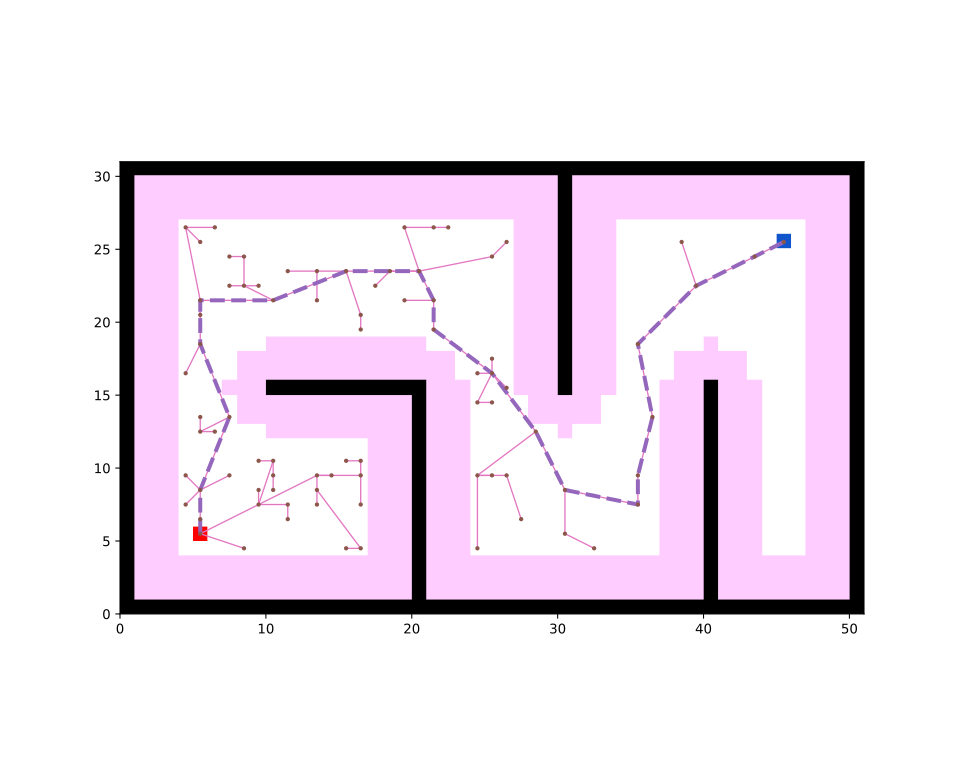
Runnable complete code:
import random
random.seed(0)

import numpy as np
np.random.seed(0)

from python_motion_planning.common import *
from python_motion_planning.path_planner import *
from python_motion_planning.controller import *

map_ = Grid(bounds=[[0, 51], [0, 31]])

map_.fill_boundary_with_obstacles()
map_[10:21, 15] = TYPES.OBSTACLE
map_[20, :15] = TYPES.OBSTACLE
map_[30, 15:] = TYPES.OBSTACLE
map_[40, :16] = TYPES.OBSTACLE

map_.inflate_obstacles(radius=3)

start = (5, 5)
goal = (45, 25)

map_[start] = TYPES.START
map_[goal] = TYPES.GOAL

planner = RRT(map_=map_, start=start, goal=goal)
path, path_info = planner.plan()
print(path)
print(path_info)

vis = Visualizer2D()
vis.plot_grid_map(map_)
vis.plot_path(path, style="--", color="C4")
vis.plot_expand_tree(path_info["expand"])
vis.show()
vis.close()
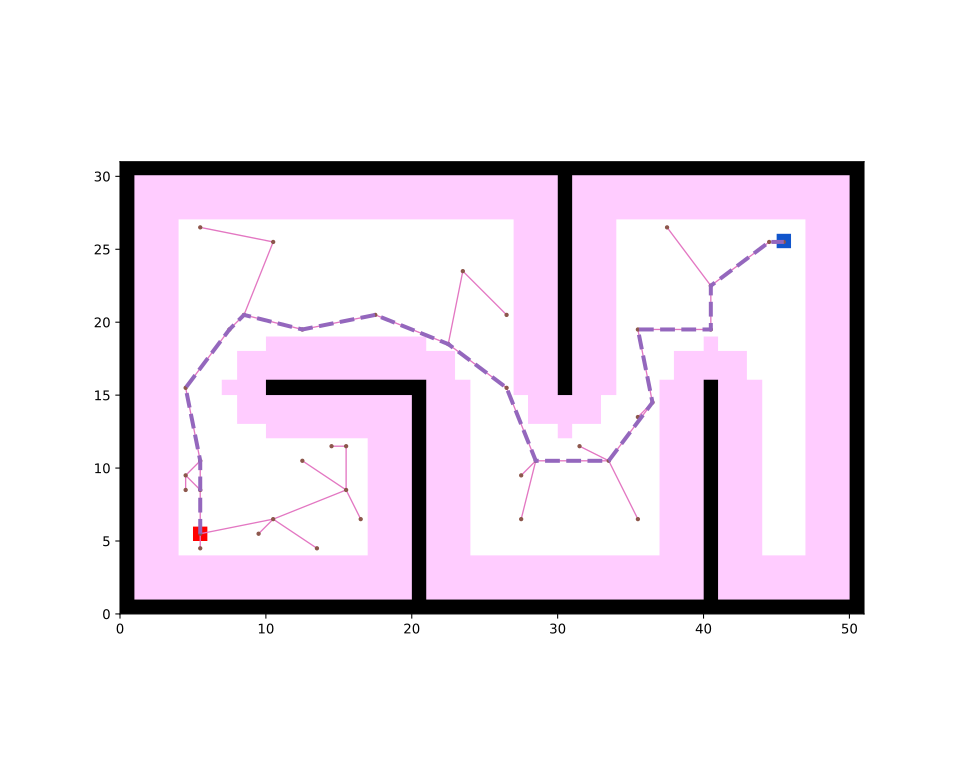
Sample search planners plan in continuous space by default. If you want to plan in discrete grid map, just set argument discrete to True. For example:
Print results:
[(5, 5), (5, 10), (4, 15), (7, 19), (8, 20), (12, 19), (17, 20), (22, 18), (26, 15), (28, 10), (33, 10), (36, 14), (35, 19), (40, 19), (40, 22), (44, 25), (45, 25)]
{'success': True, 'start': (5, 5), 'goal': (45, 25), 'length': 70.60470734303811, 'cost': 70.60470734303811, 'expand': {(5, 5): Node((5, 5), None, 0, 0), ...}}
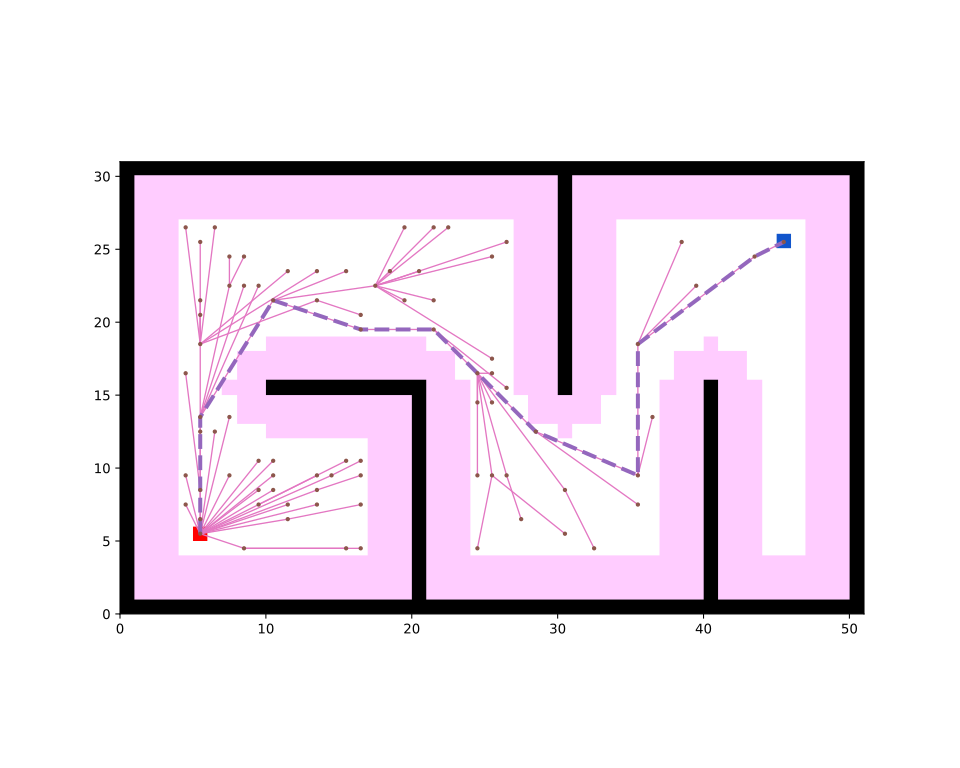
For asymptoticaly optimal sample search planners like RRT*, you can pass a callable function to argument stop_func to determine when to stop sampling. For example:
planner = RRTStar(map_=map_, start=start, goal=goal, stop_func=lambda current_step, first_success_step, max_step: (current_step >= first_success_step * 10 if first_success_step is not None else False) or (current_step >= max_step))
For the arguments of stop_func, current_step means the current step iteration, first_success_step means the first successful step to find the feasible path, and max_step means the maximum sampling step number determined by max_sample_step argument. This lambda function means to stop sampling when the number of sampling steps reaches 10 times the number of steps successfully found a feasible path for the first time.
For more sample search planners and their arguments, please refer to API Reference.