1.3.1 - Path Tracker
Before using the local path tracking controller, a reference path needs to be planned using a global path planner. The path planner calculates a sequence of points on the grid map. However, the controllers use floating-point coordinates in world frame. We need to transform the planned path from map frame to world frame.
Print results:
[(5.5, 5.5), (5.5, 6.5), (5.5, 7.5), (5.5, 8.5), (5.5, 9.5), (5.5, 10.5), (5.5, 11.5), (5.5, 12.5), (6.5, 13.5), (6.5, 14.5), (6.5, 15.5), (7.5, 16.5), (7.5, 17.5), (8.5, 18.5), (9.5, 18.5), (10.5, 19.5), (11.5, 19.5), (12.5, 19.5), (13.5, 19.5), (14.5, 19.5), (15.5, 19.5), (16.5, 19.5), (17.5, 19.5), (18.5, 19.5), (19.5, 19.5), (20.5, 19.5), (21.5, 19.5), (22.5, 18.5), (23.5, 17.5), (24.5, 16.5), (25.5, 15.5), (26.5, 14.5), (27.5, 13.5), (28.5, 12.5), (29.5, 11.5), (30.5, 11.5), (31.5, 12.5), (32.5, 12.5), (33.5, 13.5), (34.5, 14.5), (35.5, 15.5), (36.5, 16.5), (37.5, 17.5), (38.5, 18.5), (39.5, 19.5), (40.5, 20.5), (41.5, 21.5), (42.5, 22.5), (43.5, 23.5), (44.5, 24.5), (45.5, 25.5)]
Create the toy simulator in the library for rapid verification.
Add robots.
For 2D robots, poses which is 3D vector \((x, y, \theta)\) comprise of 2D position \((x, y)\) and 1D orientation \((\theta)\) in world frame. The action minimum and maximum are the range of \((a_x, a_y, \omega)\) which comprises 2D linear acceleration and 1D angular acceleration in robot frame respectively. In robot frame, the x-direction is the positive direction of the robot.
robots = {
"1": CircularRobot(dim=dim, radius=1, pose=np.array([5.5, 5.5, 0]), vel=np.zeros(3),
action_min=np.array([-2, -2, -3.14]), action_max=np.array([2, 2, 3.14]), color="C0", text="1"),
"2": DiffDriveRobot(dim=dim, radius=1, pose=np.array([5.5, 5.5, 0]), vel=np.zeros(3),
action_min=np.array([-2.82, 0, -6.28]), action_max=np.array([2.82, 0, 6.28]), color="C1", text="2")
}
Add controllers.
The observation space and action space of controllers in 2D are \((x, y, \theta)\) pose of the robot in world frame and \((a_x, a_y, \omega)\) acceleration of the robot in robot frame respectively. The path-tracking controllers need a path planned by path planners to follow. You can also set the max_lin_speed, max_ang_speed, goal_dist_tol, goal_orient_tol or other arguments of the controllers if you need.
For some controllers (e.g. APF, DWA), more arguments like obstacle_grid and robot_model are required. In PurePursuit and PID, these two arguments can be set to None. But for ease of use, we have passed in these two arguments. Please refer to the API Reference part for more details.
controllers = {}
for rid, robot in robots.items():
obs_space, act_space = env.build_robot_spaces(robot)
controllers[rid] = PurePursuit(obs_space, act_space, env.dt, path_world, robot_model=robot, obstacle_grid=map_, max_lin_speed=3, max_ang_speed=3.14)
env.add_robot(rid, robot)
Simulate and render.
The visualizer has many customizable parameters. You can set them as you want. For example, if you want to show esdf map, set show_esdf to True. Here we set it to False.
obs, _ = env.reset()
vis = Visualizer2D()
vis.render_toy_simulator(env, controllers, steps=300, show_traj=True, show_env_info=True, grid_kwargs={"show_esdf": False})
vis.plot_path(path, style="--", color="C4")
vis.show()
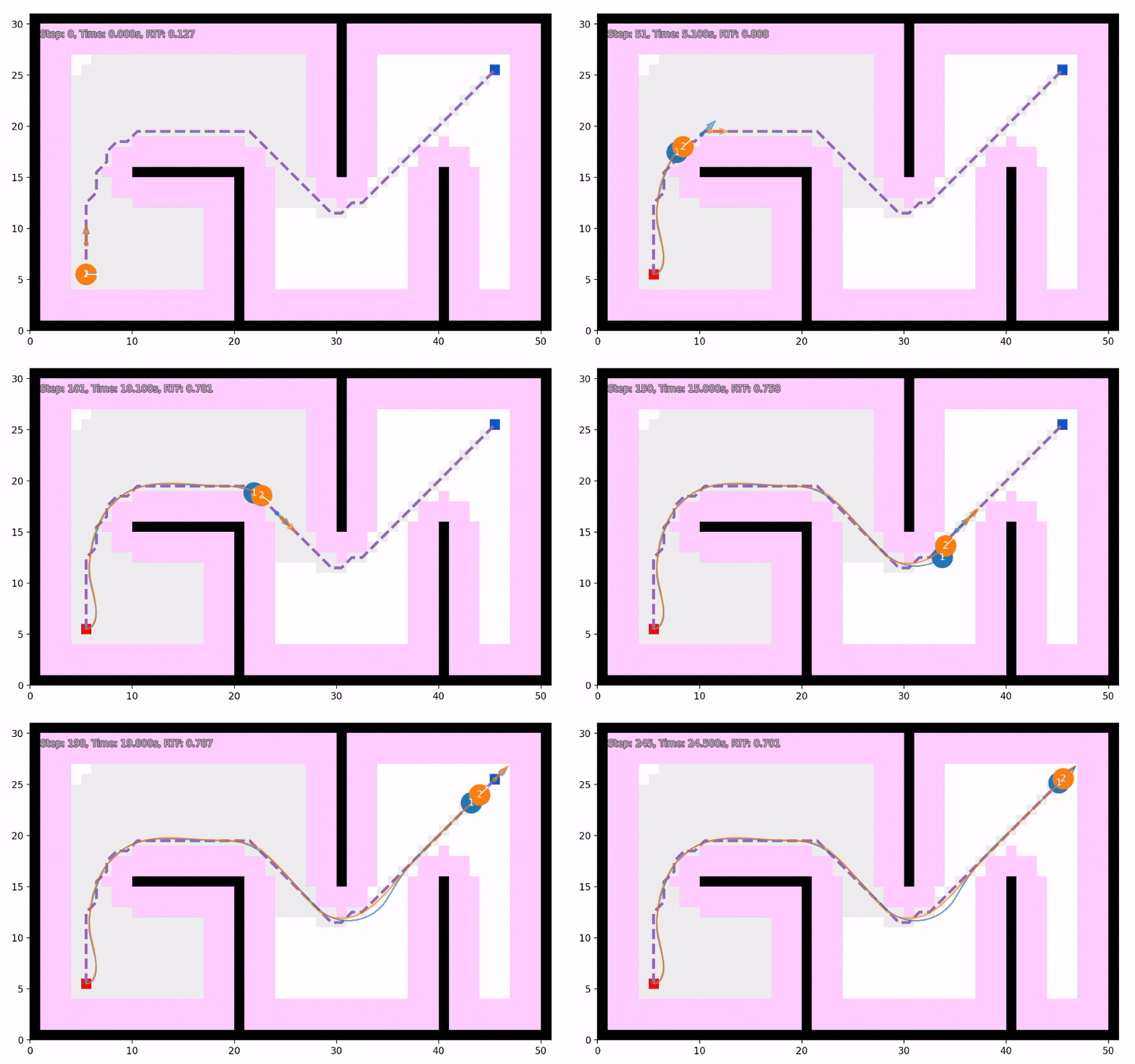
Print trajectory summary information.
for rid in robots:
ctrl = controllers[rid]
print(rid, ":", vis.get_traj_info(rid, path_world, ctrl.goal, ctrl.goal_dist_tol, ctrl.goal_orient_tol))
vis.close()
Print results (navigation_error means distance between final position and goal position. For DTW and nDTW, refer to General Evaluation for Instruction Conditioned Navigation using Dynamic Time Warping. success means the robot stop at the goal area finally. oracle_success means the robot has reached the goal area at some moment. Other similar metrics are literal meanings):
1 : {'traj_length': 64.05713763788278, 'navigation_error': 0.473638728677913, 'DTW': 154.19064862854037, 'nDTW': 0.6021756607338876, 'success': True, 'dist_success': True, 'oracle_success': True, 'oracle_dist_success': True, 'success_time': 23.3, 'dist_success_time': 23.3, 'oracle_success_time': 20.8, 'oracle_dist_success_time': 20.8}
2 : {'traj_length': 61.7926006243001, 'navigation_error': 0.10272721999078314, 'DTW': 106.21020400009954, 'nDTW': 0.7051281842674489, 'success': True, 'dist_success': True, 'oracle_success': True, 'oracle_dist_success': True, 'success_time': 22.0, 'dist_success_time': 22.0, 'oracle_success_time': 20.400000000000002, 'oracle_dist_success_time': 20.400000000000002}
Runnable complete code:
import random
random.seed(0)
import numpy as np
np.random.seed(0)
from python_motion_planning.common import *
from python_motion_planning.path_planner import *
from python_motion_planning.controller import *
map_ = Grid(bounds=[[0, 51], [0, 31]])
map_.fill_boundary_with_obstacles()
map_[10:21, 15] = TYPES.OBSTACLE
map_[20, :15] = TYPES.OBSTACLE
map_[30, 15:] = TYPES.OBSTACLE
map_[40, :16] = TYPES.OBSTACLE
map_.inflate_obstacles(radius=3)
start = (5, 5)
goal = (45, 25)
map_[start] = TYPES.START
map_[goal] = TYPES.GOAL
planner = AStar(map_=map_, start=start, goal=goal)
path, path_info = planner.plan()
map_.fill_expands(path_info["expand"]) # for visualizing the expanded nodes
path_world = map_.path_map_to_world(path)
print(path_world)
dim = 2
env = ToySimulator(dim=dim, obstacle_grid=map_, robot_collisions=False)
robots = {
    "1": CircularRobot(dim=dim, radius=1, pose=np.array([5.5, 5.5, 0]), vel=np.zeros(3),
                action_min=np.array([-2, -2, -3.14]), action_max=np.array([2, 2, 3.14]), color="C0", text="1"),
    "2": DiffDriveRobot(dim=dim, radius=1, pose=np.array([5.5, 5.5, 0]), vel=np.zeros(3),
                action_min=np.array([-2.82, 0, -6.28]), action_max=np.array([2.82, 0, 6.28]), color="C1", text="2")
}
controllers = {}
for rid, robot in robots.items():
    obs_space, act_space = env.build_robot_spaces(robot)
    controllers[rid] = PurePursuit(obs_space, act_space, env.dt, path_world, robot_model=robot, obstacle_grid=map_, max_lin_speed=3, max_ang_speed=3.14)
    env.add_robot(rid, robot)
obs, _ = env.reset()

vis = Visualizer2D()
vis.render_toy_simulator(env, controllers, steps=300, show_traj=True, show_env_info=True, grid_kwargs={"show_esdf": False})
vis.plot_path(path, style="--", color="C4")
vis.show()
for rid in robots:
    ctrl = controllers[rid]
    print(rid, ":", vis.get_traj_info(rid, path_world, ctrl.goal, ctrl.goal_dist_tol, ctrl.goal_orient_tol))
vis.close()
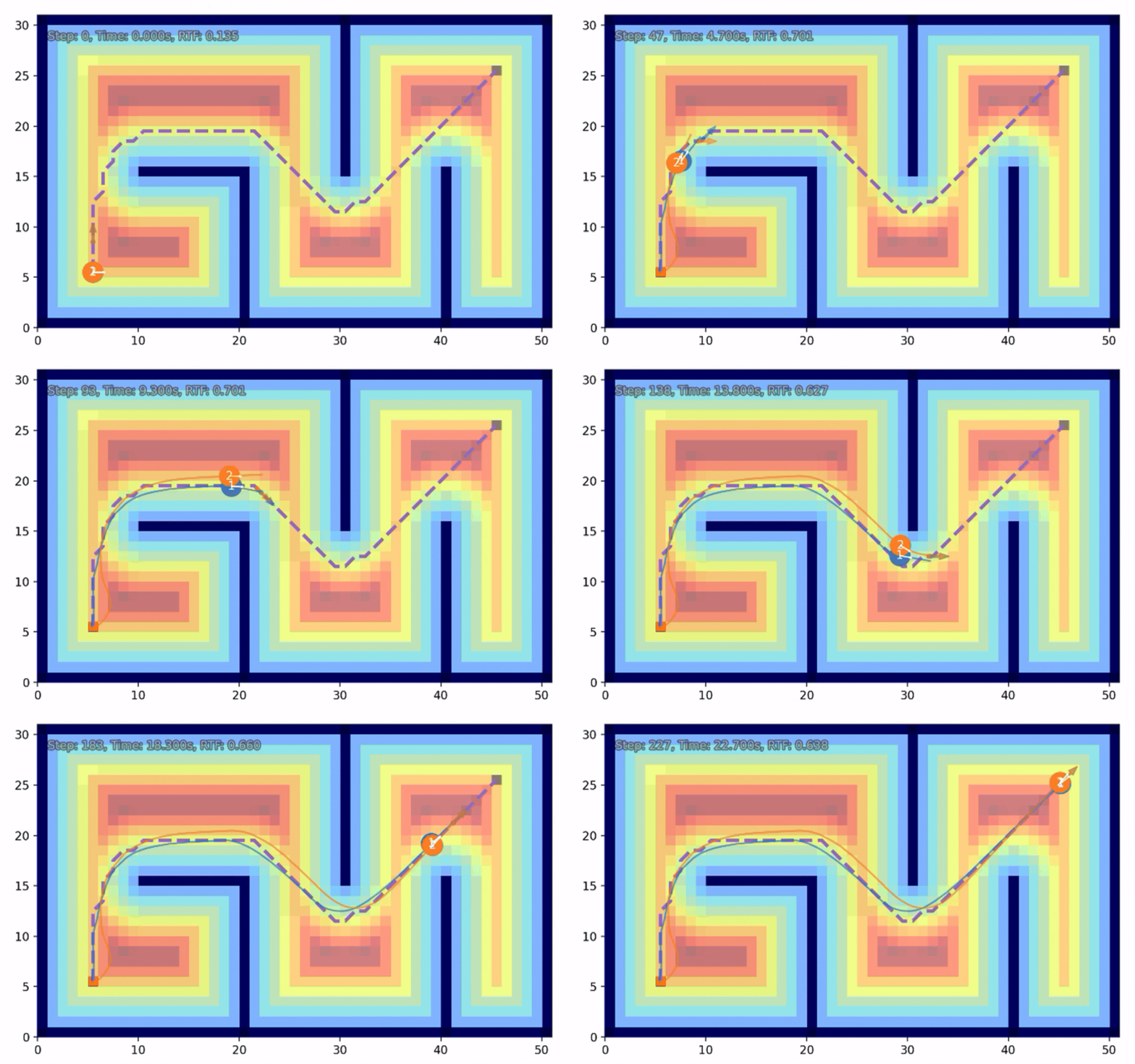
Below is another example of DWA, which uses ESDF (Euclidean Signed Distance Field) to calculate the distance to obstacles. You can visualize the ESDF by setting argument show_esdf to True.
import random
random.seed(0)

import numpy as np
np.random.seed(0)

from python_motion_planning.common import *
from python_motion_planning.path_planner import *
from python_motion_planning.controller import *

map_ = Grid(bounds=[[0, 51], [0, 31]])

map_.fill_boundary_with_obstacles()
map_[10:21, 15] = TYPES.OBSTACLE
map_[20, :15] = TYPES.OBSTACLE
map_[30, 15:] = TYPES.OBSTACLE
map_[40, :16] = TYPES.OBSTACLE

map_.inflate_obstacles(radius=3)

start = (5, 5)
goal = (45, 25)

map_[start] = TYPES.START
map_[goal] = TYPES.GOAL

planner = AStar(map_=map_, start=start, goal=goal)
path, path_info = planner.plan()
print(path)
print(path_info)
map_.fill_expands(path_info["expand"])  # for visualizing the expanded nodes

path_world = map_.path_map_to_world(path)
print(path_world)

dim = 2
env = ToySimulator(dim=dim, obstacle_grid=map_, robot_collisions=False)

robots = {
    "1": CircularRobot(dim=dim, radius=1, pose=np.array([5.5, 5.5, 0]), vel=np.zeros(3),
                action_min=np.array([-2, -2, -3.14]), action_max=np.array([2, 2, 3.14]), color="C0", text="1"),
    "2": DiffDriveRobot(dim=dim, radius=1, pose=np.array([5.5, 5.5, 0]), vel=np.zeros(3),
                action_min=np.array([-2.82, 0, -6.28]), action_max=np.array([2.82, 0, 6.28]), color="C1", text="2")
}

controllers = {}
for rid, robot in robots.items():
    obs_space, act_space = env.build_robot_spaces(robot)
    controllers[rid] = DWA(obs_space, act_space, env.dt, path_world, robot_model=robot, obstacle_grid=map_, max_lin_speed=3, max_ang_speed=3.14)
    env.add_robot(rid, robot)

obs, _ = env.reset()

vis = Visualizer2D()
vis.render_toy_simulator(env, controllers, steps=300, show_traj=True, show_env_info=True, grid_kwargs={"show_esdf": True})
vis.plot_path(path, style="--", color="C4")
vis.show()

for rid in robots:
    ctrl = controllers[rid]
    print(rid, ":", vis.get_traj_info(rid, path_world, ctrl.goal, ctrl.goal_dist_tol, ctrl.goal_orient_tol))
vis.close()
For more path-trackers and their arguments, please refer to API Reference.